HAMi AI Platform Air-Gapped Deployment Guide
This document is intended for SRE / platform engineers. It describes how to deploy HAMi AI Platform in a Kubernetes cluster using the All-in-One air-gapped package, and complete license activation, GPU node enablement, and sample workload validation.
This delivery package uses Zarf to perform image import, Helm chart installation, and subsequent upgrades in environments without external network access or with restricted networks, reducing the manual effort of syncing images and maintaining installation order.
Zarf is an application packaging and deployment tool for Kubernetes air-gap / semi-air-gap environments; it can bundle images, Helm charts, scripts, and deployment actions into a portable package.
Installation itself does not require a license. Complete the software deployment first, then apply for and import the license.
Without activation, vGPU partitioning and scheduling are unavailable, and functional verification will fail.
Air-Gapped Package Contents
The outer delivery package naming convention is:
The examples use v0.0.5, amd64, and the full package. The Slim archive is hami-ai-platform-slim-v0.0.5-airgap-amd64.tar.gz. Slim retains GPU Operator but omits NVIDIA driver images and sample workloads. Its GPU nodes must already have a compatible NVIDIA driver.
hami-ai-platform-v<VERSION>-airgap-<ARCH>.tar.gz
hami-ai-platform-v<VERSION>-airgap-<ARCH>.tar.gz.sha256
The current hami-ai-platform-v0.0.5-airgap-amd64.tar.gz contains the following key files:
| File | Purpose |
|---|---|
zarf-linux-amd64 | Linux amd64 Zarf CLI |
zarf-init-amd64-v0.86.0.tar.zst | Zarf init air-gapped package |
hami-ai-platform-v0.0.5-airgap-amd64.tar.zst | HAMi AI Platform main deployment package |
zarf-package-hami-example-gpu-burn-amd64-v0.0.2.tar.zst | GPU burn sample validation package |
zarf-package-hami-example-vllm-qwen-amd64-v0.0.4.tar.zst | vLLM + Qwen sample validation package |
kantaloupe/ | kantaloupe values examples and full values documentation |
hami/README.md | hami-enterprise full values documentation |
collect-hami-license-info.sh | License application information collection script |
collect-cluster-info.sh | Cluster diagnostic information collection script |
package-values.yaml | Component-scoped package values template |
PACKAGE-VALUES.md | Component mapping and values migration guide |
COLLECT-CLUSTER-INFO.md | Cluster information collector instructions |
Prerequisite Checks
- Use Kubernetes 1.27 or later with an available default StorageClass. The administration host needs kubectl and the bundled Zarf v0.86.0; check existing releases with zarf tools helm list -A.
For NVIDIA nodes, prepare a compatible driver and runtime configuration. Both full and Slim packages retain the optional GPU Operator. Slim omits NVIDIA driver images, so install a compatible driver on the nodes before using it.
- Prepare the vendor driver, firmware and runtime on Ascend nodes. The v0.0.5 air-gap bundle provides optional
ascend-device-pluginandnpu-exportercomponents; they do not install these node prerequisites.
If using GPU Operator alongside HAMi, disable the GPU Operator device plugin (gpu-operator.devicePlugin.enabled=false) and CDI (gpu-operator.cdi.enabled=false). This package already uses those settings. HAMi Enterprise uses scheduler.useDownward, which is incompatible with CDI.
kubectl cluster-info
kubectl version
kubectl get nodes -o wide
kubectl get storageclass
Extract, Verify, and Install Zarf
# Download delivery package and checksum file
curl -L -O <URL>
curl -L -O <SHA256_URL>

# Verify integrity
shasum -a 256 -c hami-ai-platform-v0.0.5-airgap-amd64.tar.gz.sha256

# Extract outer tar.gz
tar -xzf hami-ai-platform-v0.0.5-airgap-amd64.tar.gz

# Enter extracted directory
cd hami-ai-platform-v0.0.5-airgap-amd64
The package includes the Linux Zarf v0.86.0 CLI and its matching init package. The example below uses amd64; for arm64, use zarf-linux-arm64 and the arm64 init package. Install the bundled CLI after entering the extracted directory:
chmod +x ./zarf-linux-amd64
sudo install -m 0755 ./zarf-linux-amd64 /usr/local/bin/zarf
zarf version
Zarf includes the Helm tool. For subsequent troubleshooting of Helm release, values, and chart status, use zarf tools helm to avoid relying on a separately installed Helm in the target environment:
zarf tools helm version
zarf tools helm list -A
Initialize Zarf
Run zarf init only if the target cluster has not been initialized. Use the labeled policy to limit image rewriting to explicitly labeled namespaces or workloads. For an existing Zarf installation, inspect its Registry, StorageClass, and Agent mutation policy first; deploying the main package does not change that policy.
Use the Zarf built-in registry:
zarf init zarf-init-amd64-v0.86.0.tar.zst \
  --agent-mutation-policy=labeled \
  --confirm
Use an external registry:
zarf init zarf-init-amd64-v0.86.0.tar.zst \
  --agent-mutation-policy=labeled \
  --registry-url=harbor.example.com/zarf-amd64 \
  --registry-push-username=<username> \
  --registry-push-password=<password> \
  --confirm
💡 Mixed-architecture clusters must use separate registry prefixes. AMD64 and ARM64 clusters may share the same Harbor instance, but they must not share the same Zarf registry project or repository prefix. Images in a Zarf air-gap package are packaged for the target architecture. Deploying AMD64 and ARM64 packages sequentially to the same image path does not merge identical tags into a multi-platform manifest. A later push may replace the earlier tag and cause Pods on the other architecture to pull an incompatible image after a restart or rescheduling.
During cluster initialization, use an architecture-specific
--registry-urlfor each architecture. For example, useregistry.example.com/zarf-amd64for AMD64 andregistry.example.com/zarf-arm64for ARM64. Create the corresponding Harbor projects or repository prefixes in advance, and ensure that the account used by Zarf has push and pull permissions.
External registry parameter descriptions:
| Parameter | Description |
|---|---|
--registry-url | External image registry address |
--registry-push-username | Username used to push images |
--registry-push-password | Password used to push images |
After initialization, zarf package deploy imports the images bundled in the package and uses an admission webhook to rewrite image references for managed workloads to the Zarf registry. With the labeled policy, only resources labeled zarf.dev/agent: mutate, or resources in a namespace with that label, are processed; a label on the resource takes precedence over the namespace label. Before deployment, confirm that the namespaces for the selected components have this label. For offline workloads created separately, confirm that the namespace is labeled first. Label changes do not affect existing Pods; recreate the Pods to trigger rewriting.
Use --insecure-skip-tls-verify for the relevant command only when the TLS certificate of the target registry genuinely cannot be verified and the man-in-the-middle risk has been assessed. In production, fix the certificate chain or configure a trusted CA for the Zarf Agent instead of treating skipped TLS verification as a default.
Deploy HAMi AI Platform
The package has no required components; all components are disabled by default. Select the components needed for the deployment with --components. Adding values for a component does not select it for installation.
Component list:
| Component Name | Description | Required | Recommended |
|---|---|---|---|
tools | Ops toolset: jq, nerdctl, etc. | No | As needed |
hami | hami-enterprise Helm Chart | No | Yes |
ascend-device-plugin | Ascend Device Plugin | No | As needed for Ascend |
npu-exporter | Ascend NPU metrics collection | No | When NPU metrics are needed |
prometheus-crds | Prometheus Operator CRDs | No | Select when installing the bundled Prometheus stack |
prometheus | Kube-prometheus-stack Helm Chart | No | As needed |
gpu-operator | NVIDIA GPU Operator | No | As needed |
envoy-gateway-crds | Gateway API and Envoy Gateway CRDs | No | Install when enabling the platform Gateway |
envoy-gateway | Envoy Gateway | No | Install when enabling the platform Gateway |
hami-ai-platform | HAMi AI Platform (Kantaloupe) | No | Yes |
envoy-gateway-crds uses fixed manifests rendered from the official Envoy Gateway v1.6.2 CRD chart. Outside the Helm release, it manages 12 Gateway API v1.4.1 Experimental CRDs and 8 Envoy Gateway CRDs through Server-Side Apply, avoiding the Kubernetes 1 MiB limit for Helm release Secrets caused by large CRDs. If Gateway API is already installed in the target cluster, the existing version is left unchanged, but all 12 required CRDs are checked. Envoy Gateway CRDs are updated idempotently and the deployment waits until they reach Established. envoy-gateway uses a copy of the official main chart with crds/ removed, preventing duplicate CRD installation or downgrades.
Zarf v0.86.0 supports --values directly. Starting with main package v0.0.5, place each Chart configuration under its matching component key. Each sourcePath selects that component object and merges it into the Chart root. Precedence is Chart defaults → in-package valuesFiles → component package values. Command-line overrides also need the component prefix, for example --set-values hami.scheduler.leaderElect=true.
Tools and CRD components have no Chart values mapping. Platform authentication and ingress use hami-ai-platform.auth and hami-ai-platform.gateway. Configure the Envoy Gateway controller under the separate envoy-gateway key.
Prepare custom values
Start from package-values.yaml in the outer archive and follow PACKAGE-VALUES.md to fill in the components that need overrides. All seven components default to empty objects; omit --values if no overrides are needed. Root-level keys such as scheduler, nodeSelector, and global from v0.0.4 or earlier are not passed to Charts in v0.0.5. Move each setting under its target component key.
hami-enterprise values
Start with the outer archive’s package-values.yaml template and read PACKAGE-VALUES.md. Each top-level key below sends only its own object to the matching Chart. Tools and CRD components have no Chart values mapping.
| Package values key | Chart | Available in |
|---|---|---|
hami | HAMi Enterprise | Enterprise and AI Platform |
ascend-device-plugin | Ascend Device Plugin | Enterprise and AI Platform |
npu-exporter | NPU Exporter | Enterprise and AI Platform |
prometheus | kube-prometheus-stack | Enterprise and AI Platform |
gpu-operator | NVIDIA GPU Operator | Full and Slim Enterprise and AI Platform packages |
envoy-gateway | Envoy Gateway | AI Platform only |
hami-ai-platform | Kantaloupe | AI Platform only |
The hami/ and kantaloupe/ examples use native Chart values. Do not pass them directly as package values. In v0.0.5, old root-level keys such as scheduler, nodeSelector, and global are not forwarded to any Chart. Move them under the matching component key. If a previous file served several Charts, split its fields between those components. Common HAMi fields are listed below with their package values paths:
| Parameter | Description | Default |
|---|---|---|
hami.dra.enabled | Whether to enable and deploy DRA | false |
hami.scheduler.leaderElect | Whether to enable leader election for hami-scheduler across multiple nodes. Strongly recommended to disable for single-node clusters. | true |
hami.scheduler.replicas | Adjust the number of hami-scheduler instances | 1 |
hami.scheduler.kubeScheduler.image.registry | Image registry for the kube-scheduler image used by hami-scheduler | registry.cn-hangzhou.aliyuncs.com |
hami.scheduler.kubeScheduler.image.repository | Image repository name for the kube-scheduler image used by hami-scheduler | google_containers/kube-scheduler |
hami.scheduler.kubeScheduler.image.tag | Version of the kube-scheduler image used by hami-scheduler; should match the target cluster | "" |
Minimal package-values.yaml example. For a single-node cluster, set hami.scheduler.leaderElect to false:
hami:
  dra:
    enabled: false
  scheduler:
    leaderElect: false
For non-NVIDIA devices, enable the corresponding vendor under hami.devices. For Ascend, set both switches:
hami:
  devices:
    ascend:
      enabled: true
      hamiVnpuCore: true
The kube-scheduler image selected by HAMi must be included in the delivered package and imported into the registry chosen at zarf init. Zarf-managed workloads in hami-system have their image references rewritten by the Agent. Setting a different registry in values does not add a missing image to the package. If the target Kubernetes version requires another image, contact technical support for a matching package.
kantaloupe values
The in-package kantaloupe/README.md documents the full Chart values. The examples below and the in-package kantaloupe/ and hami/ examples use native Chart values. For the Zarf v0.0.5 main package, place them under hami-ai-platform and hami, respectively. Direct Helm installation still uses the native Chart structure. Root-level settings such as auth and gateway shown below cannot be used directly as package values.
kantaloupe provides settings for feature flags, service exposure, and monitoring integration. Configure them as required. For the complete values reference, see kantaloupe Helm Chart Values Reference.
For v0.0.5 air-gap deployment, place Kantaloupe settings under hami-ai-platform in package-values.yaml. Configure the Envoy Gateway controller under the separate top-level envoy-gateway key.
- Configure default platform administrator credentials
auth:
  jwtSecret: "<JWT_SIGNING_SECRET>"
  bootstrapAdminUsername: "bootstrap-platform-admin"
  bootstrapAdminPassword: "<ADMIN_PASSWORD>"
  bootstrapAdminFullName: "Platform Administrator"
  bootstrapAdminEmail: "admin@email.com"
- Expose Envoy Gateway through a NodePort Service and use an external load balancer (cloud-managed or self-managed) to forward Layer 4 traffic .
gateway:
  enabled: true
  hostnames:
    - your-domain.example.com
  apiserverCors:
    enabled: true
    allowCredentials: true
    allowOrigins:
      - https://your-domain.example.com
  envoy:
    service:
      ports:
        http:
          nodePort: 30080
        https:
          nodePort: 30443
      type: NodePort
  listeners:
    - name: http
      port: 80
      protocol: HTTP
    - name: https
      port: 443
      protocol: HTTPS
      tls:
        certificateRef:
          name: your-domain-tls-secret
        redirectFromHttp: true
- Use Envoy Gateway with a NodePort Service for a simple PoC
gateway:
  enabled: true
  listeners:
    - name: http
      port: 80
      protocol: HTTP
  envoy:
    service:
      type: NodePort
      ports:
        http:
          nodePort: 30080
- Use a LoadBalancer Service managed by a cloud provider or bare-metal load balancer controller
gateway:
  enabled: true
  hostnames:
    - your.domain
  listeners:
    - name: http
      port: 80
      protocol: HTTP
    - name: https
      port: 443
      protocol: HTTPS
      tls:
        certificateRef:
          name: your-tls-secret
        redirectFromHttp: true
  envoy:
    service:
      type: LoadBalancer
      ports:
        http: {}
        https: {}
- Override the Prometheus Query API address (default:
http://prometheus-kube-prometheus-prometheus.monitoring.svc.cluster.local:9090)
apiserver:
  prometheusAddr: http://your-prometheus-query-api.com:9090

controllerManager:
  prometheusAddr: http://your-prometheus-query-api.com:9090
Save the configuration as package-values.yaml. This example configures HAMi, platform authentication, and the platform Gateway separately; adjust it for the target environment and replace the authentication placeholders before deployment:
hami:
  dra:
    enabled: false
  scheduler:
    leaderElect: true

hami-ai-platform:
  auth:
    enabled: true
    jwtSecret: "<JWT_SIGNING_SECRET>"
    bootstrapAdminUsername: "<ADMIN_USERNAME>"
    bootstrapAdminPassword: "<ADMIN_PASSWORD>"
  gateway:
    enabled: true
    listeners:
      - name: http
        port: 80
        protocol: HTTP
    envoy:
      service:
        type: NodePort
        ports:
          http:
            nodePort: 30080
  hamiNamespace: hami-system
To review custom values, inspect the values and rendered manifests using the same --components and --values that you will use for deployment. This example selects HAMi, Gateway and AI Platform. Add optional hardware and monitoring components only when needed.
zarf package inspect values-files hami-ai-platform-v0.0.5-airgap-amd64.tar.zst \
  --components=hami,envoy-gateway-crds,envoy-gateway,hami-ai-platform \
  --values=package-values.yaml
zarf package inspect manifests hami-ai-platform-v0.0.5-airgap-amd64.tar.zst \
  --components=hami,envoy-gateway-crds,envoy-gateway,hami-ai-platform \
  --values=package-values.yaml
Execute Deployment
For a first AI Platform installation, select HAMi core, Gateway CRDs, Envoy Gateway and AI Platform. If HAMi Enterprise is already installed, use the incremental command below. Select GPU Operator, Ascend components and the monitoring stack only when needed.
zarf package deploy hami-ai-platform-v0.0.5-airgap-amd64.tar.zst \
  --components=hami,envoy-gateway-crds,envoy-gateway,hami-ai-platform \
  --values=package-values.yaml \
  --confirm
If the cluster already has HAMi Enterprise deployed, you only need to add Gateway and AI Platform afterward:
zarf package deploy hami-ai-platform-v0.0.5-airgap-amd64.tar.zst \
  --components=envoy-gateway-crds,envoy-gateway,hami-ai-platform \
  --values=package-values.yaml \
  --confirm
Optional: NVIDIA GPU Operator
GPU Operator is optional, as are the Ascend components below. Skip it when the nodes already have a compatible driver, NVIDIA Container Toolkit and runtime configuration. See the HAMi NVIDIA GPU node prerequisites for the detailed Operator values. Do not enable CDI: this HAMi Enterprise deployment uses scheduler.useDownward. The bundled Operator has CDI and its own device plugin disabled. Slim retains GPU Operator, but its GPU nodes must already have compatible drivers.
zarf package deploy hami-ai-platform-v0.0.5-airgap-amd64.tar.zst \
  --components=gpu-operator \
  --values=package-values.yaml \
  --confirm
Optional: Ascend Components
ascend-device-plugin and npu-exporter are optional in both full and Slim packages. The plugin runs in hami-system and uses the existing hami-scheduler-device ConfigMap; the Exporter runs in npu-exporter. Avoid duplicate installations. Ascend-only clusters do not need GPU Operator; mixed clusters may select each hardware component as needed.
Prepare the Nodes
NPU Exporter supports ordinary Ascend compute nodes using containerd. Install the driver, firmware, and runtime on each target node first. Atlas 200I SoC A1 core boards require separate upstream manifests and startup scripts and are outside this component’s scope.
The default selector reuses the plugin’s ascend: "on" node label. No separate Exporter label is needed. The default containerd directory is /run/containerd. Override the Exporter settings only if the actual node labels or runtime path differ.
The installer creates the Exporter log directory and sets ownership to root:root and mode 0750. No manual directory setup on each node is needed. Installation uses the standard Zarf and Helm readiness checks. Verify metric collection and monitoring integration as described under “Verify the Deployment” below.
Configure and Deploy
The default node labels and containerd path need no extra configuration. Keep HAMi settings aligned with the target NPU model and partitioning mode. For a non-default containerd path, configure npu-exporter.hostPaths.containerd with the path used by the target nodes.
To add these components to a cluster where HAMi is already installed, select them as below. For a first installation, add them to the component combination for your edition. Also select prometheus-crds,prometheus when using the bundled monitoring stack. Use the main package for the selected version and architecture.
zarf package deploy <main-package.tar.zst> \
  --components=ascend-device-plugin,npu-exporter \
  --values=package-values.yaml --confirm
Omit --values if no overrides are needed. Select only npu-exporter if the plugin is already installed. Image changes require rebuilding the package with the new image; an offline deployment cannot pull an image that was not packaged.
Connect Monitoring
Clusters managed by Kantaloupe: The Exporter does not create a ServiceMonitor by default. Kantaloupe manages local and member-cluster scraping. The Service in npu-exporter uses the labels and port expected by the platform template, so no custom scrape manifest is needed.
Whenever a data-plane cluster introduces a new device vendor, enable that vendor’s monitor switch in the control-plane Kantaloupe values and run Helm upgrade. Use the following configuration for Ascend, even when the control plane has no Ascend devices: it also enables the recording rules needed for member-cluster metrics. For Zarf, nest the configuration under hami-ai-platform; for a direct Helm upgrade, omit that outer key and preserve the existing configuration.
hami-ai-platform:
  monitoring:
    enabled: true
    vendorServiceMonitor:
      enabled: true
      enableAscendServicemonitor: true
Standalone monitoring without Kantaloupe: Enable the Exporter’s optional ServiceMonitor. When using the bundled stack, install prometheus-crds,prometheus. After deployment, confirm the targets and metrics in Prometheus. Avoid two monitors scraping the same Exporter.
npu-exporter:
  serviceMonitor:
    enabled: true
Verify the Deployment
kubectl -n hami-system get daemonsets
kubectl -n npu-exporter get daemonset npu-exporter
kubectl -n npu-exporter rollout status daemonset/npu-exporter --timeout=180s
kubectl -n npu-exporter get pods -o wide
kubectl -n npu-exporter get endpointslice -l kubernetes.io/service-name=npu-exporter
Check the Exporter DaemonSet’s DESIRED and READY counts: both should equal the expected number of Ascend nodes and be greater than zero. Query up{job="npu-exporter",namespace="npu-exporter"} and npu_chip_info_utilization in Prometheus to confirm scraping and metrics for each node. Zero utilization is valid for idle devices. Also verify device-plugin registration and run a workload requesting the expected Ascend resources to confirm allocation and device access.
For Kantaloupe, query the member cluster’s raw npu_chip_info_* metrics and normalized kantaloupe_gpu_core_used{vendor="ascend",cluster="<member-cluster-name>"} metrics on the control plane. Exporter Pods being Ready does not prove federation and platform monitoring are connected. Prometheus configuration updates and the first scrape take some time after a ServiceMonitor is created. If metrics are missing, check the driver and DCMI. For scrape failures, check target discovery, configuration reload, ServiceMonitor labels, duplicate scraping, and network policies.
Maintenance and Non-default Environments
For Exporter troubleshooting, check that the node has a usable containerd.sock at the configured containerd directory. The component mounts the directory, rather than an individual socket file.
The NetworkPolicy allows TCP 8082 from Pods labeled app.kubernetes.io/name: prometheus across namespaces and denies outbound traffic by default; enforcement depends on the CNI. For other monitoring labels, override npu-exporter.networkPolicy.prometheusPodSelector. Configure standalone ServiceMonitor selector labels through npu-exporter.serviceMonitor.labels.
The Exporter runs as root in a privileged container and accesses host driver libraries, DCMI libraries, and the runtime socket. A read-only socket mount does not restrict runtime API calls. Keep DCMI libraries and their parent directories owned by root and not writable by group or others. Before upgrading the driver, stop workloads and then stop NPU Exporter.
| Default host path | Purpose | Mount access |
|---|---|---|
/usr/local/Ascend/driver | Driver libraries | Read-only |
/usr/local/dcmi | DCMI libraries | Read-only |
/sys | Device information | Read-only |
/run/containerd | Containerd and CRI socket access | Read-only directory mount |
/etc/localtime | Node timezone | Read-only |
/var/log/mindx-dl/npu-exporter | Exporter logs | Writable |
test -d /usr/local/Ascend/driver
test -d /usr/local/dcmi
test -S /run/containerd/containerd.sock
Removing the component does not remove host logs. The container root filesystem is read-only, /tmp uses emptyDir, and the ServiceAccount token is not mounted. These settings do not remove the privileged container’s host access.
If a component remains stuck for a long time, the installation has encountered an issue. You can use zarf tools helm to diagnose the component; if the failure is caused by incorrect values during Helm rendering or installation, fix package-values.yaml and rerun the same zarf package deploy ... command.
After an interrupted deployment, resolve the issue and resume with the same zarf package deploy ... --components=... --values=... command. Zarf will skip re-importing images when the digest has not changed; it will perform a Helm upgrade when Helm charts or values have changed.
If the target resources are already managed by another Helm release and you have confirmed that they should be transferred to the current Zarf package, review the resource scope and then use --take-ownership. Use --force-conflicts only for Server-Side Apply field ownership conflicts. It overwrites fields managed by other field managers, so use it only after confirming that this deployment may take over those fields; do not use it as a general retry option.
Enable GPU Nodes
The HAMi NVIDIA device plugin starts on nodes labeled gpu=on. Apply this label to NVIDIA nodes that HAMi should manage. Ascend components use their own nodeSelector; gpu=on is not their selection rule.
kubectl label nodes <node-name> gpu=on
Nodes and Monitoring
Monitoring is optional. If the cluster already has compatible Prometheus or VictoriaMetrics monitoring, connect it using the selectors below. To install the bundled kube-prometheus-stack, select both monitoring components:
zarf package deploy hami-ai-platform-v0.0.5-airgap-amd64.tar.zst \
  --components=prometheus-crds,prometheus \
  --values=package-values.yaml \
  --confirm
kubectl describe node <node-name>
kubectl api-resources --api-group=monitoring.coreos.com
For Prometheus, match ServiceMonitor.metadata.labels to Prometheus.spec.serviceMonitorSelector and check the namespace selector. For VictoriaMetrics Operator, VMAgent.spec.serviceScrapeSelector selects VMServiceScrape.metadata.labels; also check serviceScrapeNamespaceSelector and any ServiceMonitor conversion.
The v0.0.5 air-gap bundle sets hami.legacyMetrics=false. Check that the relevant scrape targets report up=1, then query these current NVIDIA metrics and confirm that they return data:
-
DCGM_FI_DEV_GPU_UTIL -
hami_host_gpu_utilization_ratio -
hami_gpu_core_allocated_ratio
In addition to exporter metrics, you also need to query kantaloupe_gpu_temp to verify that kantaloupe service metrics are correctly collected.
License Acquisition
Start license activation once the HAMi core and required platform services are ready. Optional GPU Operator, Ascend, and monitoring components need not be installed first.
Use either method below to obtain the license request information. If the HAMi AI Platform site is not yet accessible, use the collection script.
Use HAMi AI Platform
-
Sign in to HAMi AI Platform with a platform administrator account.
-
Open License and System Information .
-
Follow the instructions on the page to obtain the license request information.
Run the Collection Script
The collection script requires kubectl and jq:
# Download and run the script
curl -fsSL https://public.hami.run/collect-hami-license-info.sh | bash

# Run a local copy provided with the delivery materials
bash collect-hami-license-info.sh
The command outputs JSON in the following format:
{
  "esn": "96565d61-986a-4918-aafb-448ff6e3746b",
  "deviceInstances": [
    {
      "uuid": "GPU-ceee905d-48ac-93de-a81b-17c00e1e5e02",
      "deviceType": "NVIDIA A10"
    }
  ]
}
Send the license request information to Dynamia.ai sales, pre-sales, or delivery personnel, then complete activation as instructed.
Post-Activation Verification
kubectl -n hami-system get pods
kubectl describe node <gpu-node>
kubectl get events --field-selector involvedObject.name=hami-license -n hami-system
kubectl get nodes -o custom-columns='NODE:.metadata.name,LICENSE:.metadata.annotations.hami\.io/nvidia-license'
A LicenseValid event indicates that license validation succeeded. Confirm that the selected component Pods are Running or Completed and that accelerator resources are registered on the managed nodes.
HAMi AI Platform Verification
# 1. Pod Status
kubectl -n kantaloupe-system get pods

# 2. Service Accessibility
kubectl -n kantaloupe-system get svc
After the HAMi AI Platform service is exposed, open the site and confirm that the frontend and backend are working normally.
Create Workload
On the console Workload page, create an application such as gpu-burn. In an air-gap environment, its image must already be in the relevant Zarf package or an accessible internal registry. For Zarf image rewriting, label the workload Namespace zarf.dev/agent: mutate.
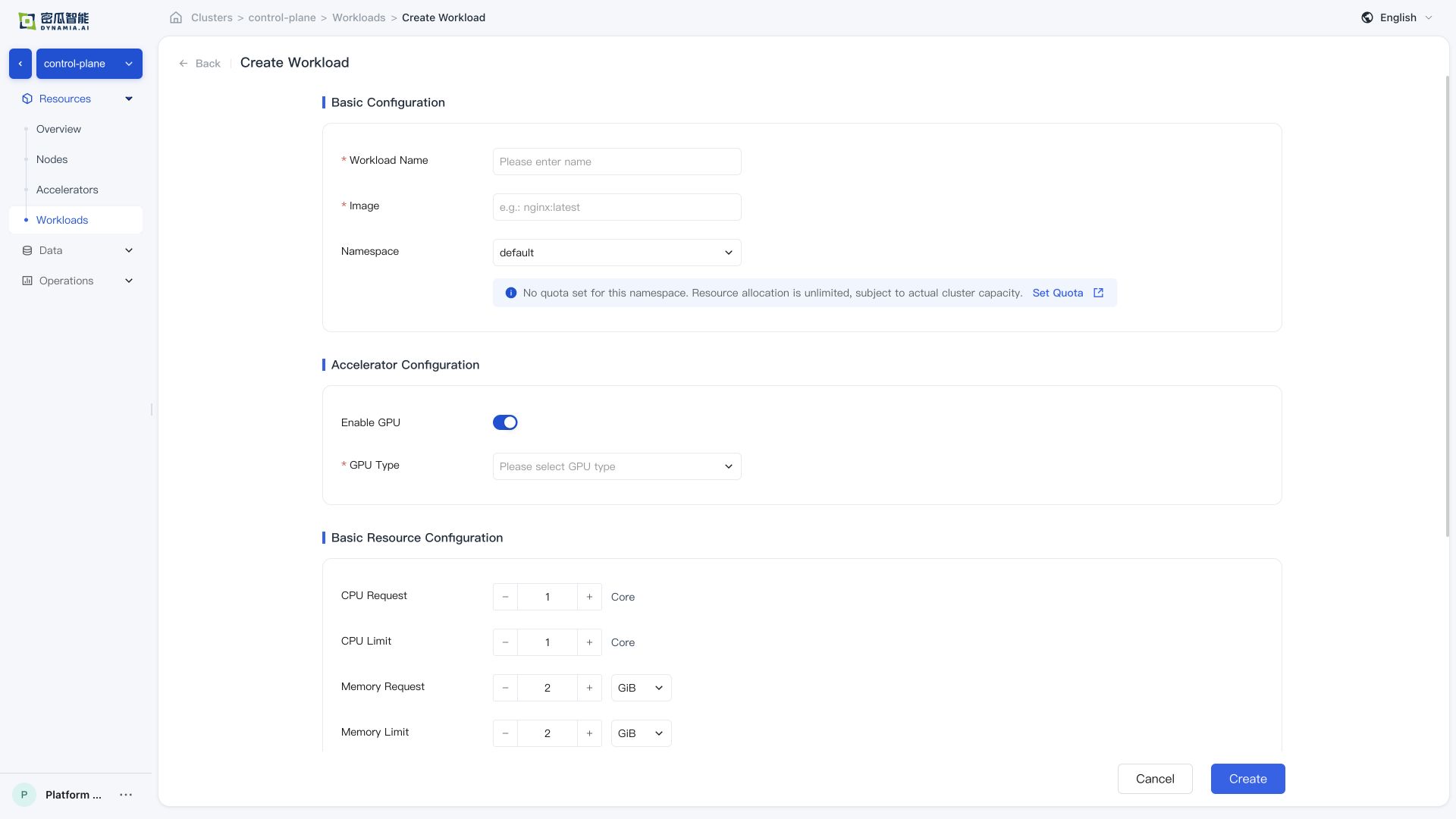
After creation, confirm that the following verification items all pass:
-
Creation successful , no errors in the console
-
Workload list : application status, search, list metrics, and monitoring panels (GPU SM / GPU MEM / CPU / Memory) are normal; time switching and charts meet expectations
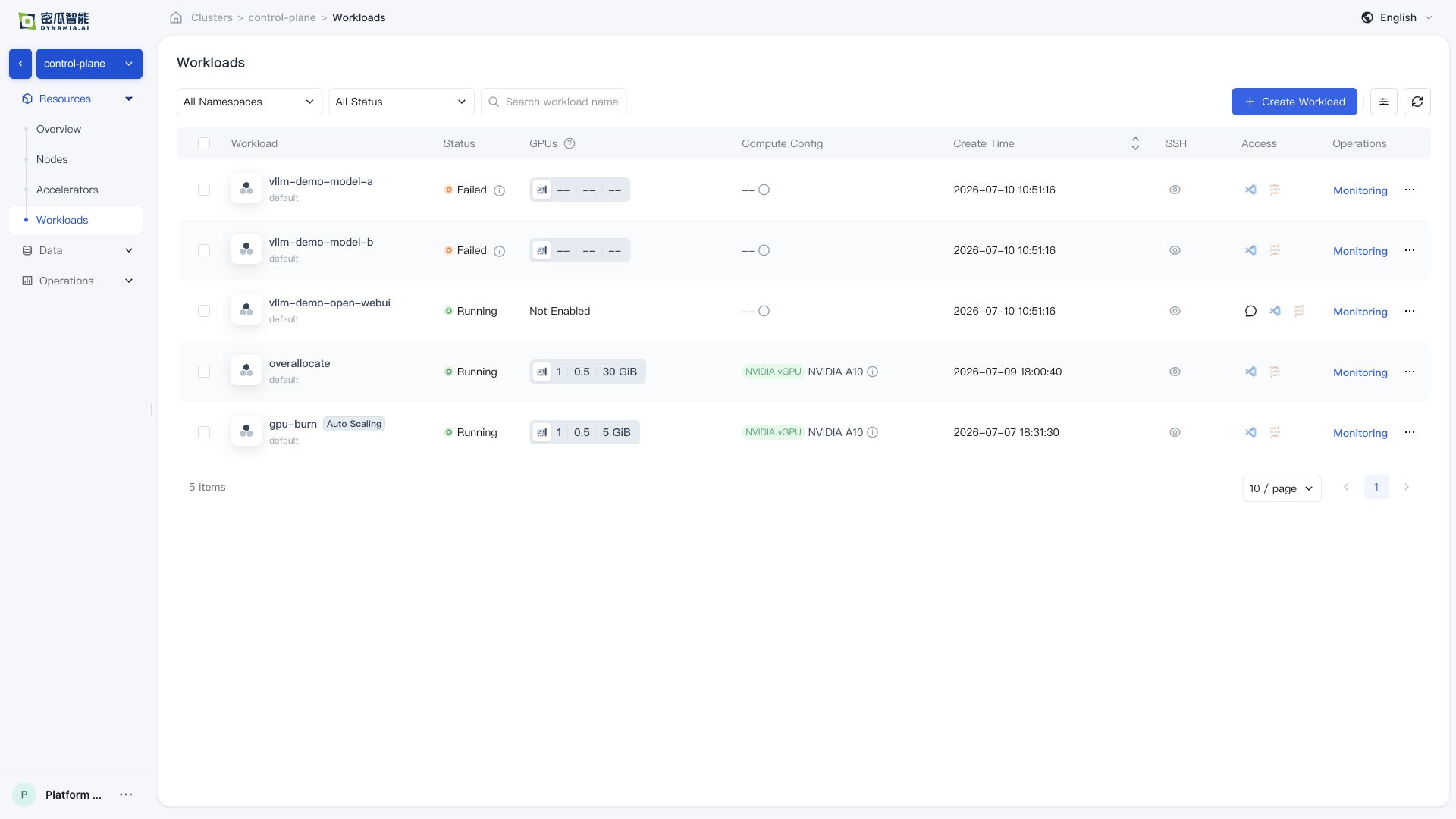
- Application details : basic information, resource overview, and monitoring data are normal; navigating from the detail page to the GPU / Node page, resource overview and monitoring data are normal
Sample Workload Verification
The full amd64 outer package includes two independent Zarf sample packages. Deploy them after the core components are ready; no manual kubectl apply is needed for these two samples. Slim does not include samples. Their versions are independent of the main package: GPU Burn remains v0.0.2 and vLLM Qwen remains v0.0.4.
GPU Burn Verification
zarf package deploy zarf-package-hami-example-gpu-burn-amd64-v0.0.2.tar.zst --confirm
After deployment, check the Deployment / Pod status:
kubectl -n hami-example get deploy turbo-gpu-burn
kubectl -n hami-example get pods -l app=turbo-gpu-burn
kubectl -n hami-example logs -l app=turbo-gpu-burn --tail=50
This sample creates hami-example/turbo-gpu-burn Deployment; clean it up as needed after verification:
kubectl -n hami-example delete deploy turbo-gpu-burn
vLLM + Qwen Verification
zarf package deploy zarf-package-hami-example-vllm-qwen-amd64-v0.0.4.tar.zst --confirm
After deployment, check the inference service status:
kubectl -n hami-example get deploy vllm-qwen3
kubectl -n hami-example get pods -l app=vllm-qwen3
kubectl -n hami-example get svc vllm-qwen3-webui
Once the Pod is ready, access Open WebUI at http://<node-ip>:30081/openwebui. Confirm that your firewall and cluster network policy allow port 30081.
# Get cluster node IP (any reachable node is fine)
kubectl get nodes -o wide

# Access via browser
# http://<node-ip>:30081/openwebui
Open WebUI is automatically connected to the vLLM sidecar in the same Pod; open the page to start interacting.
If the Pod remains Pending, first check whether the license is activated, whether GPU nodes are labeled with gpu=on, and whether the node GPU drivers are normal.
Troubleshooting
Use the following commands to inspect workloads and recent cluster events:
kubectl get pods -A | grep -E 'hami|gpu-operator|prometheus|vllm|gpu-burn'
kubectl get events -A --sort-by=.lastTimestamp | tail -50
zarf package list
Collect Kubernetes and GPU inventory with collect-cluster-info.sh; see COLLECT-CLUSTER-INFO.md. First install tools to provide jq. Set PACKAGE to your main package below: the AI Platform filename is hami-ai-platform-v0.0.5-airgap-amd64.tar.zst; Slim uses the corresponding -slim- filename. For arm64, replace amd64 in both CLI and package names. Preserve the target kubeconfig when using sudo.
KUBECONFIG_PATH="${KUBECONFIG:-$HOME/.kube/config}"
COLLECTOR_PATH="$PWD/collect-cluster-info.sh"
ROOT_PATH="/usr/local/sbin:/usr/local/bin:/usr/sbin:/usr/bin:/sbin:/bin:/snap/bin"
PACKAGE=./hami-ai-platform-v0.0.5-airgap-amd64.tar.zst

sudo env PATH="$ROOT_PATH" sh -c 'command -v kubectl >/dev/null'
sudo env KUBECONFIG="$KUBECONFIG_PATH" PATH="$ROOT_PATH" \
  ./zarf-linux-amd64 package deploy "$PACKAGE" \
  --components=tools --confirm
sudo env PATH="$ROOT_PATH" sh -c 'command -v jq >/dev/null'
sudo env KUBECONFIG="$KUBECONFIG_PATH" PATH="$ROOT_PATH" \
  "$COLLECTOR_PATH" > cluster-info.json
sudo /usr/local/bin/jq empty cluster-info.json
Common Issues
| Symptom | Possible Cause | Resolution |
|---|---|---|
| Image pull fails | The node cannot reach the image registry, registry authentication is missing or invalid, or the image reference is incorrect | Inspect the Pod events and image reference, verify node DNS and network access to the registry, and configure the required image pull credentials. |
hami-device-plugin Pod is Pending or missing | The node is not labeled gpu=on | kubectl label nodes <node> gpu=on |
hami-device-plugin Pod is in CrashLoopBackOff | It conflicts with the default NVIDIA device-plugin | Disable the default NVIDIA device plugin. Online Helm uses --set devicePlugin.enabled=false; v0.0.5 package values use gpu-operator.devicePlugin.enabled=false. |
| HAMi metrics are unavailable | The serviceMonitorSelector of the Prometheus resource does not match the labels on the ServiceMonitor resource | Align monitoring/prometheus-kube-prometheus-prometheus spec.serviceMonitorSelector with the labels on the HAMi ServiceMonitor, and check serviceMonitorNamespaceSelector. |
nvidia-smi reports an error | The GPU driver is not ready | Check the driver Pod status in the gpu-operator Namespace. |
Sample workload remains Pending | The license is not activated, GPU capacity is insufficient, or node labels are missing | Check the license, GPU node labels, and kubectl describe pod events. |
Gateway has no ingress address | Gateway API or Envoy Gateway CRDs are not ready, the Envoy Gateway release is unhealthy, or the Envoy Service type is unsuitable for the cluster | Check that the required Gateway API and Envoy Gateway CRDs are Established, then inspect the Envoy Gateway release, Gateway conditions and Envoy Service. For air-gap installation, use zarf tools helm status eg -n envoy-gateway-system. The v0.0.5 package waits for GatewayClass Accepted and Gateway Programmed. Do not delete CRDs as a retry step. |
Limitations of Installing Components with Zarf
Control the Image Rewrite Scope Explicitly with Labels
We recommend initializing Zarf with zarf init --agent-mutation-policy=labeled. This policy rewrites only resources labeled zarf.dev/agent: mutate, or resources in a namespace with that label. An individual workload that must retain its original image reference can be labeled zarf.dev/agent: ignore, and a resource label takes precedence over the namespace label. This allows image rewriting to be controlled per resource, even within the same cluster or namespace, without having the Agent manage every application namespace by default. Only images included in the Zarf package can be rewritten and pulled in an offline environment. After changing labels, recreate existing Pods because they are not updated automatically.
Manage Each Set of Resources Through a Single Delivery Pipeline
Zarf manages the chart releases in a package through Helm. Managing the same Kubernetes resources in parallel through another native Helm workflow can still cause release ownership, field ownership, and upgrade ordering conflicts. Continue routine upgrades with a newer Zarf package. If existing resources must be transferred to Zarf, review the release and resource scope before using --take-ownership. Use --force-conflicts only for Server-Side Apply field conflicts that you have confirmed may be overwritten; it should not be used as a routine installation option.
Support
-
Email: info@dynamia.ai
-
Sales / technical support: 400-026-7800
-
Customers with active commercial agreements should submit support requests through their dedicated support channel.