HAMi 平台版在线部署手册
本文档面向 SRE / 平台工程师,介绍如何在 Kubernetes 集群上部署 HAMi AI Platform ,并完成与 HAMi、Prometheus、NVIDIA GPU Operator、Gateway 等基础组件的对接和功能验证。
⚠️ 安装 ≠ 激活
完成 Helm Chart 安装后,平台服务可以启动;HAMi 的 GPU 虚拟化和调度功能需完成许可证激活后才能使用。
安装过程本身不依赖证书,您可以先完成部署,再通过后续步骤申请并导入证书。
简而言之:先装软件,后拿证书;不激活则 vGPU 切分与调度功能不可用,验证也会失败。
前置条件清单
| 类型 | 要求 | 验证命令 |
|---|---|---|
| Kubernetes | 在线安装请按所选 Chart 的 Kubernetes 支持范围配置集群。 | kubectl version |
| 容器运行时 | containerd、CRI-O 等 Kubernetes CRI 运行时;GPU 节点已配置 NVIDIA Container Toolkit | kubectl get nodes -o wide |
| GPU 驱动 | NVIDIA driver ≥ 470(推荐 ≥ 550) | nvidia-smi |
| Prometheus CRD | 启用 Prometheus 或 VictoriaMetrics 监控对接时,需要 monitoring.coreos.com CRD。 | kubectl api-resources --api-group=monitoring.coreos.com |
| GPU Operator | 如已安装 GPU Operator,请确认 NVIDIA device-plugin 的管理方式,避免与 HAMi 重复提供设备。 | helm list -A |
| 存储空间 | 建议大于 30 GB | df -h |
HAMi 自带的 NVIDIA device-plugin 与 GPU Operator 内置 device-plugin 不应同时启用。请在 GPU Operator 的 Helm values 中设置 devicePlugin.enabled=false。集群还需有可用的默认 StorageClass。
HAMi AI Platform 使用 Kubernetes Gateway API 和 Envoy Gateway 暴露服务。部署前检查目标集群是否已有相应的 Gateway API CRD 和控制器;尚未安装时,按下文安装 Envoy Gateway。Gateway API 的概念与安装方式参见 官方文档。
安装
本节使用在线 Helm Charts 安装。安装完成后,还需要申请证书并激活。
路径 A:在线 Helm Charts 安装
使用当前 kubeconfig context 指向目标集群后,先安装 HAMi 核心,再按需安装 NVIDIA GPU Operator、昇腾设备插件和监控组件。
推荐使用版本追踪系统维护集群中所有 Helm Chart releases 的 values 文件。 通过使用 -f example-values.yaml 覆盖 Charts 中默认 values 中与之相对应的 key。
选择好 kubeconfig context 后,开始操作:
安装 dynamia-ai/hami-enterprise:
helm install hami \
  oci://dynamia-ai-registry.cn-hangzhou.cr.aliyuncs.com/public/charts/hami-enterprise \
  --version 2.10.0-r2 \
  --namespace hami-system \
  --create-namespace
hami-enterprise 常见 Chart 自定义选项如下表,完整 values 配置请见:HAMi Helm Chart Values Reference。
| 参数 | 说明 | 默认值 |
|---|---|---|
dra.enabled | 是否部署启用 DRA | false |
scheduler.leaderElect | 是否启用hami-scheduler的多节点选举 | true |
scheduler.replicas | 调整 hami-scheduler的实例数量 | 1 |
scheduler.kubeScheduler.image.registry | hami-scheduler所使用的kube-scheduler镜像仓库。 | registry.cn-hangzhou.aliyuncs.com |
scheduler.kubeScheduler.image.repository | hami-scheduler所使用的kube-scheduler镜像名称。 | "google_containers/kube-scheduler" |
scheduler.kubeScheduler.image.tag | hami-scheduler所使用的kube-scheduler镜像版本。如果不填,chart 会推算一个合适的版本。 | "" |
使用非 NVIDIA 设备时,必须在 HAMi values 的 devices 下启用对应厂商。昇腾节点至少配置:
devices:
  ascend:
    enabled: true
    hamiVnpuCore: true
可选:NVIDIA GPU Operator
NVIDIA GPU Operator 是可选组件。节点已具备兼容的驱动、NVIDIA Container Toolkit 和运行时配置时,可以跳过。节点准备及 GPU Operator values 取舍请参阅 HAMi NVIDIA GPU 节点准备文档。如安装或复用 GPU Operator,关闭其内置 device-plugin(devicePlugin.enabled=false)和 CDI(cdi.enabled=false)。当前 HAMi Enterprise 使用 scheduler.useDownward,与 CDI 不兼容。调整已有集群的 CDI 配置前,请先评估运行中的 GPU 工作负载。
helm repo add nvidia https://helm.ngc.nvidia.com/nvidia && helm repo update

helm install --wait --generate-name \
  -n gpu-operator --create-namespace \
  nvidia/gpu-operator \
  --set devicePlugin.enabled=false \
  --set dcgmExporter.serviceMonitor.enabled=true \
  --set cdi.enabled=false \
  --version=v25.10.1
可选:昇腾设备插件
在 HAMi 核心安装完成且 devices.ascend.enabled 与 devices.ascend.hamiVnpuCore 已启用后,按需安装昇腾设备插件。已有同类设备插件时避免重复安装。插件复用 HAMi 创建的 hami-scheduler-device ConfigMap。
nameOverride: "ascend-device-plugin"
fullnameOverride: "ascend-device-plugin"
config:
  create: false
  existingDeviceConfigMapName: hami-scheduler-device
helm install ascend-device-plugin \
  oci://dynamia-ai-registry.cn-hangzhou.cr.aliyuncs.com/public/dynamia-ai/charts/ascend-device-plugin \
  --version 0.2.1 \
  --namespace hami-system \
  -f ascend-device-plugin.yaml
如果集群中没有 Gateway API 实现,安装 envoyproxy/envoy-gateway 用于暴露服务:
helm install eg \
  oci://docker.io/envoyproxy/gateway-helm \
  --version v1.6.2 \
  --namespace envoy-gateway-system \
  --create-namespace \
  --set global.images.envoyGateway.image=docker.io/envoyproxy/gateway:v1.6.2 \
  --set global.image.ratelimit.image=docker.io/envoyproxy/ratelimit:99d85510 \
  --set config.envoyGateway.gateway.controllerName=gateway.envoyproxy.io/gatewayclass-controller \
  --set config.envoyGateway.provider.type=Kubernetes
安装 dynamia-ai/kantaloupe (AI Platform 平台服务,下称 kantaloupe ):
helm install kantaloupe \
  oci://dynamia-ai-registry.cn-hangzhou.cr.aliyuncs.com/public/charts/kantaloupe-chart \
  --version 0.20.1 \
  --namespace kantaloupe-system \
  --create-namespace \
  --set fullnameOverride=kantaloupe
kantaloupe 由于需要配置功能特性、服务暴露、监控指标采集等功能,配置项较多,请按需配置,完整 values 配置请见 kantaloupe Helm Chart Value Reference。
以下示例使用 Kantaloupe Chart 原生 values 结构。在线 Helm 安装时可合并后直接使用。
- 配置默认平台管理员信息
auth:
  jwtSecret: "<JWT_SIGNING_SECRET>"
  bootstrapAdminUsername: "bootstrap-platform-admin"
  bootstrapAdminPassword: "<ADMIN_PASSWORD>"
  bootstrapAdminFullName: "Platform Administrator"
  bootstrapAdminEmail: "admin@email.com"
- 使用 envoy-gateway NodePort 暴露服务,在集群外部使用LoadBalancer(云厂商负载均衡、自建负载均衡等)转发四层流量 。
gateway:
  enabled: true
  hostnames:
    - your-domain.example.com
  apiserverCors:
    enabled: true
    allowCredentials: true
    allowOrigins:
      - https://your-domain.example.com
  envoy:
    service:
      ports:
        http:
          nodePort: 30080
        https:
          nodePort: 30443
      type: NodePort
  listeners:
    - name: http
      port: 80
      protocol: HTTP
    - name: https
      port: 443
      protocol: HTTPS
      tls:
        certificateRef:
          name: your-domain-tls-secret
        redirectFromHttp: true
- 使用 envoy-gateway NodePort 暴露服务,简单 PoC
gateway:
  enabled: true
  listeners:
    - name: http
      port: 80
      protocol: HTTP
  envoy:
    service:
      type: NodePort
      ports:
        http:
          nodePort: 30080
- 使用云厂商或裸金属服务提供的负载均衡 controller 接手的 LoadBalancer service
gateway:
  enabled: true
  hostnames:
    - your.domain
  listeners:
    - name: http
      port: 80
      protocol: HTTP
    - name: https
      port: 443
      protocol: HTTPS
      tls:
        certificateRef:
          name: your-tls-secret
        redirectFromHttp: true
  envoy:
    service:
      type: LoadBalancer
      ports:
        http: {}
        https: {}
- 替换 prometheus Query API addr(默认为
http://prometheus-kube-prometheus-prometheus.monitoring.svc.cluster.local:9090)
apiserver:
  prometheusAddr: http://your-prometheus-query-api.com:9090

controllerManager:
  prometheusAddr: http://your-prometheus-query-api.com:9090
启用 GPU 节点
HAMi 的 NVIDIA device-plugin 仅在带 gpu=on 标签的节点上启动。以下标签用于需要由 HAMi 管理的 NVIDIA 节点;Ascend 组件通过各自的 nodeSelector 选择节点:
kubectl label nodes <node-name> gpu=on
验证:kubectl -n hami-system get pods 应能看到 hami-device-plugin-*、hami-scheduler-* 处于 Running 状态。
监控为可选项。仅在需要采集指标且集群尚无兼容监控系统时,按下例安装 kube-prometheus-stack;已有 Prometheus 或 VictoriaMetrics 时,请在后面的“监控对接”章节接入现有系统。
helm install prometheus \
  oci://ghcr.io/prometheus-community/charts/kube-prometheus-stack \
  --version 72.3.0 \
  --namespace monitoring \
  --create-namespace \
  --set alertmanager.enabled=false \
  --set grafana.enabled=false
监控对接
按需将 HAMi、DCGM Exporter 或 NPU Exporter 指标接入现有监控系统。需要随本手册安装 Prometheus 时,可选用前述 kube-prometheus-stack 命令。查询指标前,先检查相应采集目标 up=1。
如果使用 Prometheus, ServiceMonitor 资源的 metadata.labels 必须与 Prometheus 资源的 spec.serviceMonitorSelector 字段匹配,否则 Prometheus不会采集这些指标。
使用 VictoriaMetrics Operator 时,VMAgent.spec.serviceScrapeSelector 匹配 VMServiceScrape.metadata.labels,同时检查 serviceScrapeNamespaceSelector。从 ServiceMonitor 转换时,应确认已生成对应的 VMServiceScrape。
验证指标采集
| Exporter | 查询指标 | 预期 |
|---|---|---|
dcgm-exporter | DCGM_FI_DEV_GPU_UTIL | 返回非空值 |
hami-exporter | hami_host_gpu_utilization_ratio | 返回非空值 |
hami-device-plugin-exporter | hami_gpu_core_allocated_ratio | 返回非空值 |
除了 exporter 的指标,还需要查询 kantaloupe_gpu_temp 验证 kantaloupe 服务指标是否被正确采集。
证书获取
HAMi 核心与平台服务就绪后即可获取授权申请信息;按需安装的 GPU Operator、昇腾及监控组件不构成前置条件。
-
使用平台管理员账号登录 HAMi AI Platform。
-
进入 License 与系统信息 页面。
-
按照页面提示获取授权申请信息。
-
将授权申请信息发送给密瓜智能销售或交付人员。
-
根据指引完成激活。
激活后验证
kubectl -n hami-system get pods
kubectl describe node <gpu-node>
kubectl get events --field-selector involvedObject.name=hami-license -n hami-system
kubectl get nodes -o custom-columns='NODE:.metadata.name,LICENSE:.metadata.annotations.hami\.io/nvidia-license'
事件中出现 LicenseValid 表示许可证校验通过。确认已选择组件的 Pod 处于 Running 或 Completed 状态,并确认受管节点已注册加速卡资源。
在线示例工作负载验证
运行以下示例前,确认目标集群能够拉取测试镜像 nvidia/cuda:12.4.0-base-ubuntu22.04。如果集群使用私有镜像仓库,请先将该镜像同步到私有仓库,并修改示例中的镜像地址。
kubectl delete pod hami-smoke --ignore-not-found

kubectl apply -f - <<'EOF'
apiVersion: v1
kind: Pod
metadata:
  name: hami-smoke
spec:
  restartPolicy: Never
  containers:
    - name: cuda
      image: nvidia/cuda:12.4.0-base-ubuntu22.04
      command: ["sh", "-c", "nvidia-smi && sleep 30"]
      resources:
        limits:
          nvidia.com/gpu: 1
          nvidia.com/gpumem: 2000
EOF

kubectl wait --for=condition=Ready pod/hami-smoke --timeout=180s
kubectl logs hami-smoke
Pod 进入 Ready 状态且日志正常输出 GPU 信息,表示 HAMi 已完成 GPU 调度,容器内的 NVIDIA 运行时可以正常访问 GPU。验证完成后删除测试 Pod。
kubectl delete pod hami-smoke
HAMi AI Platform验证
# 1. Pod 状态
kubectl -n kantaloupe-system get pods

# 2. 服务可达
kubectl -n kantaloupe-system get svc
HAMi AI Platform 服务暴露后,打开站点,确认前后端正常工作。
创建工作负载
在控制台工作负载页面创建应用(如 gpu-burn)。确保业务镜像位于集群可访问的镜像仓库,并验证工作负载正常运行。
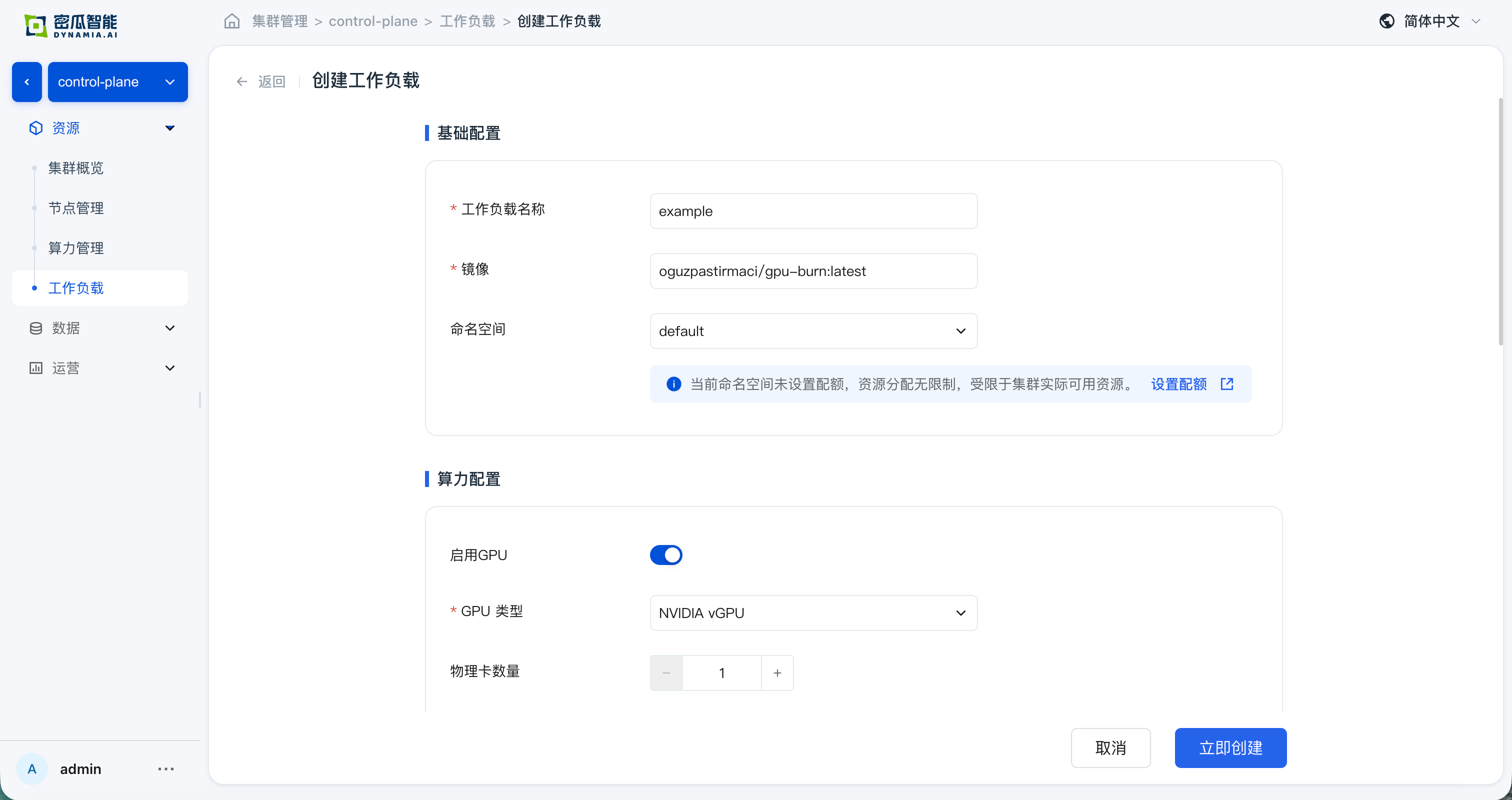
创建完成后,确认以下验证项均通过:
-
创建成功 ,控制台无报错
-
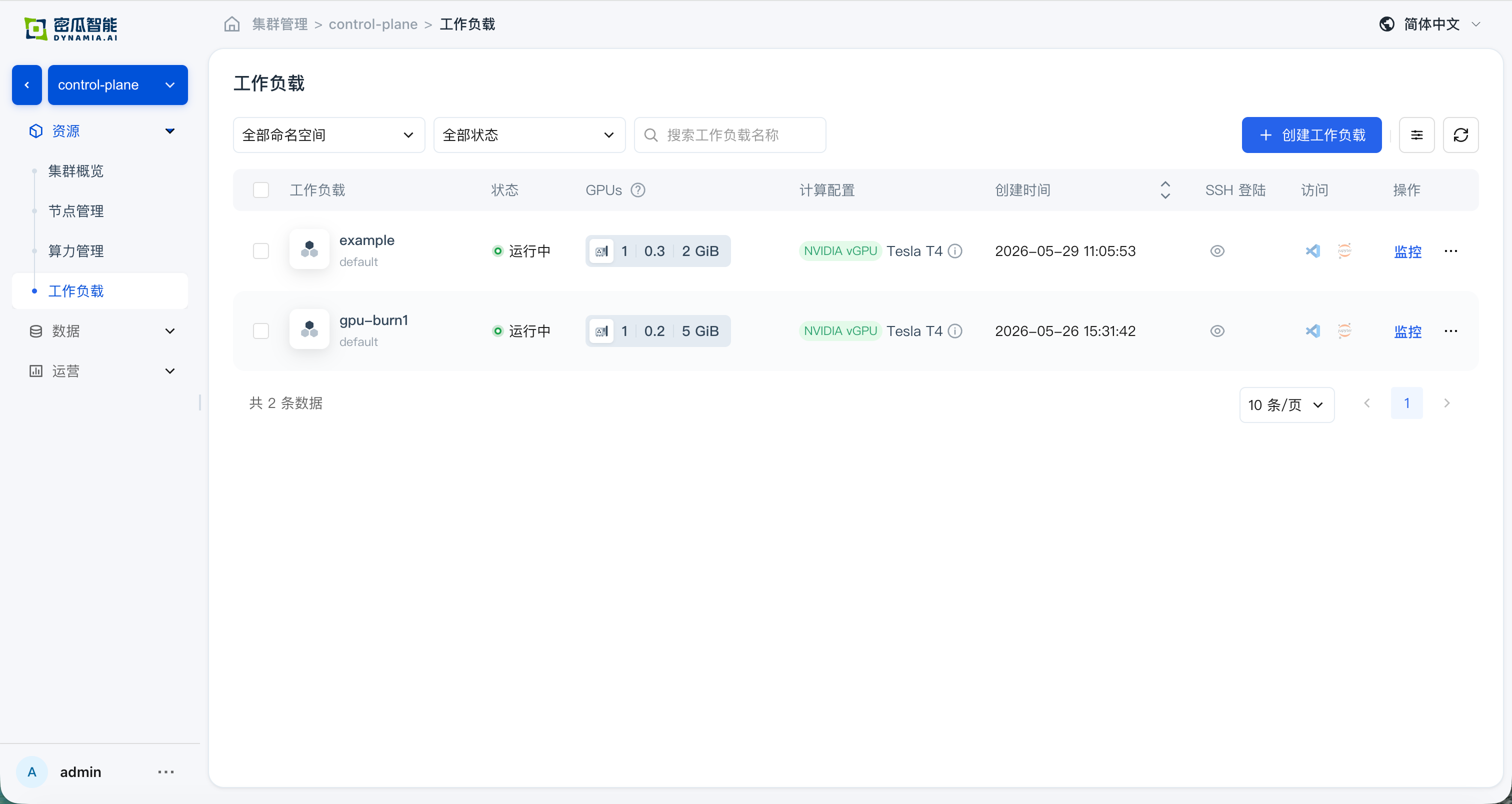
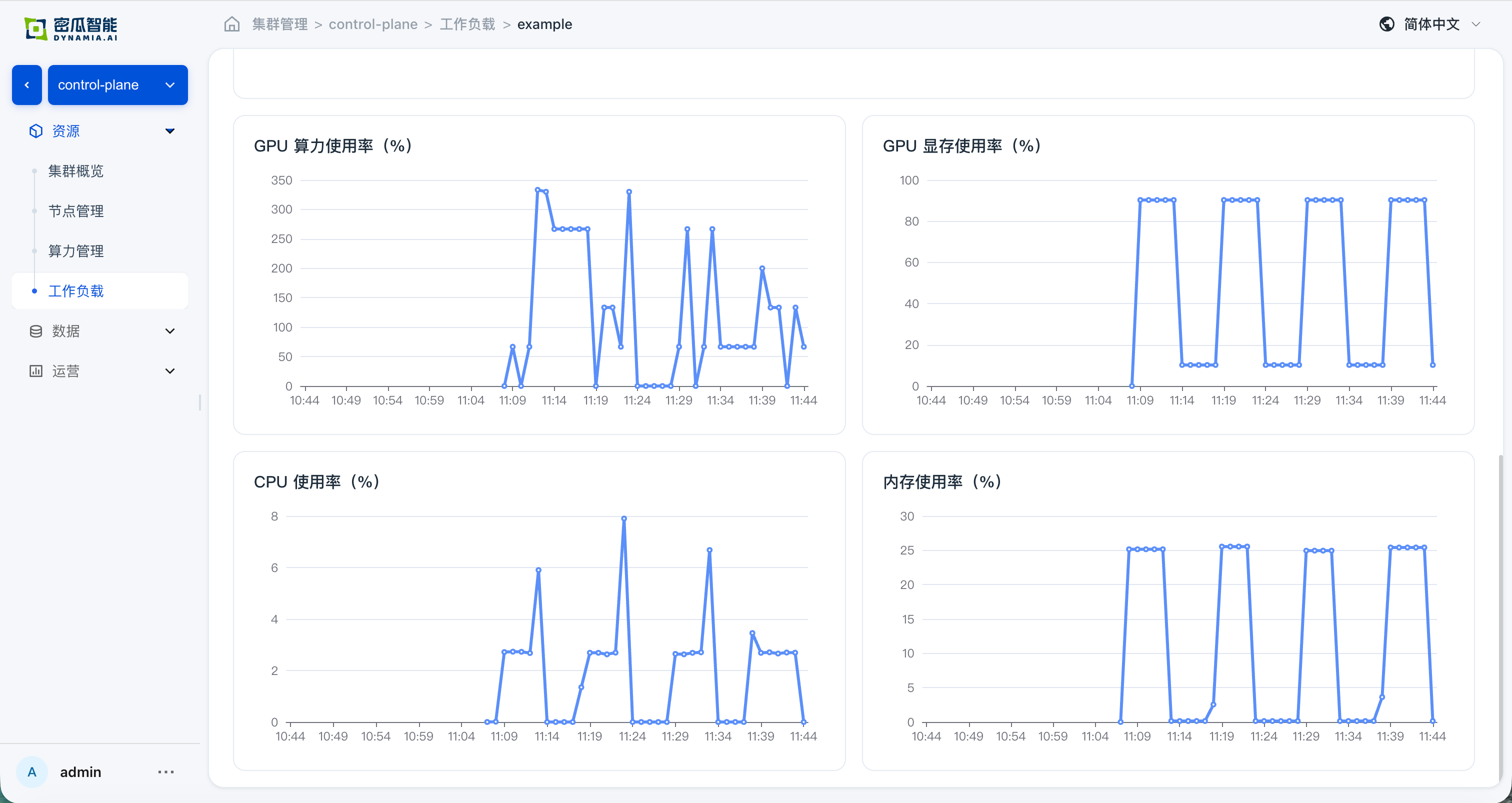
负载列表 :应用状态、检索、列表指标与监控面板(GPU SM / GPU MEM / CPU / Memory)正常,时间切换与图表符合预期
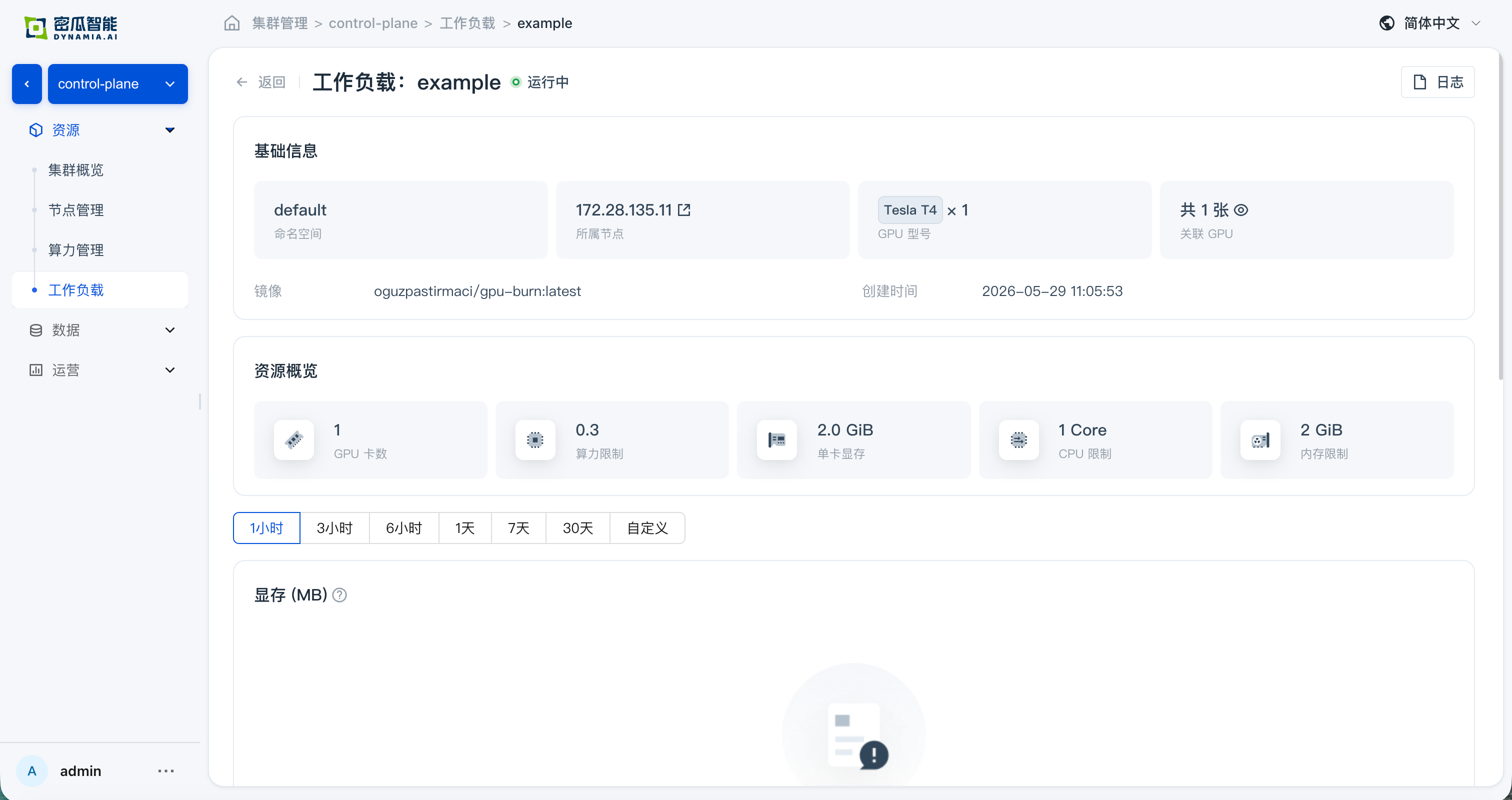
- 应用详情 :基础信息、资源总览、与监控数据正常;从详情页跳转 GPU / 节点页面,资源总览与监控数据正常
常见问题
| 现象 | 可能原因 | 处理 |
|---|---|---|
| 镜像拉不下来 | 目标节点无法访问镜像仓库、镜像仓库认证信息缺失或无效,或者镜像地址错误 | 检查 Pod 事件和实际镜像地址,确认节点能够解析并访问镜像仓库,并配置所需的 imagePullSecrets。 |
hami-device-plugin Pod Pending 或者不存在 | 节点未打 gpu=on 标签 | kubectl label nodes <node> gpu=on |
hami-device-plugin Pod CrashLoopBackOff | 与 NVIDIA 默认 device-plugin 冲突 | 禁用 GPU Operator 的 devicePlugin(--set devicePlugin.enabled=false)。 |
| 查不到 HAMi 指标 | Prometheus 资源的serviceMonitorSelector 与 ServiceMonitor 资源中的 label 不匹配 | 对齐 prometheus/prometheus-kube-prometheus-prometheus 的 spec.serviceMonitorSelector 和 hami-enterprise 的 serviceMonitor labels。 |
nvidia-smi 报错 | GPU 驱动未就绪 | 检查 gpu-operator namespace 下 driver Pod 状态。 |
示例 workload Pending | 证书未激活、GPU 不足或节点标签缺失 | 检查证书、GPU 节点标签和 kubectl describe pod 事件 |
Gateway 没有入口地址 | Gateway API 或 Envoy Gateway CRD 未就绪、Envoy Gateway release 异常,或 Envoy Service 类型不适配集群 | 检查 20 个相关 CRD 的 Established 状态,运行 helm status eg -n envoy-gateway-system,并检查 Gateway 条件和 Envoy Service。不要通过卸载 CRD release 或删除 CRD 重试。 |
获取支持
-
售前 / 技术支持:400-026-7800
-
已签订商业合同的客户请通过专属支持渠道提交 Issue